
Healthcare Payroll Software: Match the System to Your Shift Rules

Updated: Oct 11

A daytime medical practice and a round-the-clock care facility need different payroll demonstrations. Choose healthcare payroll software that can reproduce your approved shift and pay rules. A daytime medical practice may need dependable hours approval, tax service and accounting exports. A facility operating around the clock may also need overnight shift handling, several pay premiums, relief coverage and a carefully configured overtime method. The same brand can propose very different products and services for those needs.
Your first purchase decision is the boundary between scheduling, timekeeping and payroll. Decide which system records work, which applies the approved pay rules, and who corrects a discrepancy before submission. Then ask shortlisted providers to demonstrate that complete path using a small, fictional set of healthcare shifts.
This guide provides care-setting routes, a worked differential example and a Healthcare Shift-to-Pay Trial Notebook you can copy directly from the page. Recommendations draw on official product descriptions reviewed in October 2026 and on federal guidance. The trials are proposed buyer exercises; they do not represent hands-on testing of the listed platforms. Have the employer's payroll and legal advisers confirm the rules that apply to its workers and locations.

Need a shortlist suited to your healthcare payroll? An advisor at SelectSoftware Reviews can suggest payroll providers to evaluate for your care setting at no cost. Explain your care setting, existing time system and pay-rule complexity so the conversation can focus on providers worth demonstrating.
Table of contents
Start with the care setting and the person running payroll
Write a brief that describes the employer's actual operation. Include the number of employing entities, work locations, pay groups and people responsible for time approval. List the hourly and salaried populations separately, with any classification questions marked for specialist review. Use fictional worker names in the purchasing exercise, and leave patient records out of the demonstration packet.
For a daytime practice, begin with the routine week: front-desk and clinical hours, approved leave, a pay-rate change and the accounting export. If one office manager performs these tasks between other responsibilities, ease of correction and backup coverage deserve close attention. Advanced scheduling features earn their cost only when the practice will use them. A smaller purchase can be sensible when an existing time system already produces dependable approved data.
For a continuous-care facility, begin with a difficult roster. Include an overnight shift, a relief assignment, a differential and a change after the manager approved time. Ask whether payroll can explain each component of the employee's earnings. Keep scheduling eligibility, such as credentials required for an assignment, separate from the calculation that pays for completed work. Both may matter, but they have different owners. A long-term care facility subject to CMS staffing submission requirements should also confirm how payroll and time data support its Payroll-Based Journal staffing submission, including agency and contract staff.
For a multi-site group, add movement between departments or locations and identify the legal employer for each assignment. Central payroll needs a consolidated view, while local managers may need restricted approval access. The demonstration should show what each manager can see, who approves the combined record and how finance receives the department split. A growing hospital group may need a broader workforce platform and an implementation team with experience in its chosen rule set.
Record the staffing constraint too. A capable platform with extensive configuration can require more administration than a small practice can sustain. Conversely, a streamlined service that depends on your team preparing complex earnings externally may leave a facility with recurring spreadsheet work. Compare those workloads explicitly before selecting the software route.
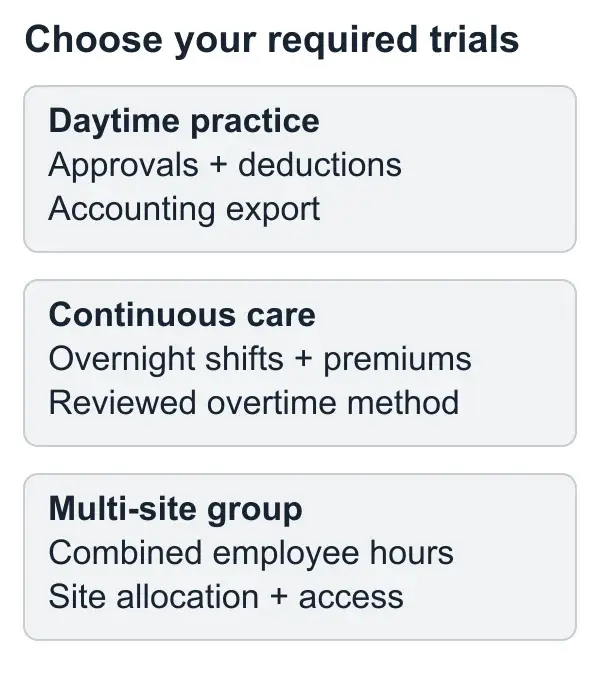
Select the first trial by care setting, then add the cases required by your actual pay policies. Headcount alone does not select the route.
Confirm the overtime method before configuring a demo
The federal starting point for covered nonexempt healthcare employees is overtime after 40 hours in a workweek. The Department of Labor's healthcare overtime guidance also identifies errors involving bonuses, differentials and workers performing more than one job. DOL Fact Sheet 54 explains these issues with healthcare examples.
Certain hospital and residential-care employment can use the federal 8-and-80 system under prescribed conditions. It requires a prior employer-employee agreement or understanding, a fixed 14-day period and overtime treatment for work exceeding eight hours in a workday or 80 hours in that period. 29 CFR 778.601 describes the conditions and calculation framework.
Do not select that setting merely because payroll runs every two weeks. Obtain a reviewed rule specification for each affected population, including applicable state requirements, workday boundaries and the treatment of premiums. Ask the provider to identify exactly where those settings live. If the rule has not been resolved, keep that trial open for specialist review rather than scoring a convenient demonstration as a pass.
Use separate fictional employees for different approved overtime methods. The specification should also state which earnings belong in the calculation, how late changes are treated and who may edit the rule. A sales demonstration should show the saved configuration as well as the resulting pay. Otherwise, a manually adjusted preview can conceal a setup that will behave differently next week.
Make a shift differential visible in the calculation
A differential is an additional earnings component associated with specified work. Define its trigger clearly: qualifying hours, effective dates, amount or percentage, and interaction with other employer premiums. Ask whether the proposed setup derives it from the time record or requires someone to enter a separate earnings line. Either approach needs a way to detect missed or duplicated hours.
Federal rules require nightshift differentials to enter the regular rate used for statutory overtime. 29 CFR 778.207(b) distinguishes these payments from qualifying overtime premiums.
Use this fictional weekly example for a covered nonexempt employee under the standard 40-hour system. Assume a $30 base rate, 48 worked hours, and a $4 differential on 12 of those hours. There are no other earnings, exclusions or additional state or contract requirements in the example. All 48 hours receive straight-time pay, including the differential where earned.
Base earnings: 48 × $30 = $1,440.
Differential earnings: 12 × $4 = $48.
Straight-time earnings: $1,440 + $48 = $1,488.
Regular rate: $1,488 ÷ 48 = $31.
Additional overtime premium: 8 × $31 × 0.5 = $124.
Total gross pay: $1,488 + $124 = $1,612.
The extra half-time is used here because straight-time earnings already cover all worked hours. Ask the provider to reproduce the amount and show the underlying lines. A preview that simply pays eight hours at an extra half of the $30 base rate produces $1,608, leaving a $4 difference.

This illustration follows the example's stated assumptions. Keep the employee's full earnings and applicable rules in the actual calculation.
Watch what happens at midnight and across locations
An overnight shift needs a consistent record of when work started, when it ended and which time zone applies. Have the provider enter a shift that crosses midnight, then show the original timestamps, any split time entries and the approved hours transferred into payroll. Compare them with the employer's specified workday and workweek boundaries. A change in the calendar date should be explainable in the report.
Ask how the system handles a corrected end time after approval. Does the correction create a new version, reopen approval, or require a manual payroll adjustment? Have the demonstrator show both the manager view and the payroll administrator view. For a facility with night managers and a daytime payroll team, this handoff can matter more than the appearance of the time-entry screen.
Use a second case with one employee working 28 hours at Site A and 16 at Site B for the same employer in the same standard workweek. The combined record contains 44 hours. Your test should retain the site allocation while applying the reviewed pay rules to the combined employee record. A department-level report alone will not show whether payroll has considered the complete week.
Distinguish a department transfer from a change of employing entity. Ask the provider to demonstrate each only when it occurs in your business, with your adviser specifying the legal and tax treatment. A transfer between sites in different states also needs a reviewed location and withholding setup. Keep those questions in the purchase packet so they reach the implementation team rather than becoming assumptions in a generic import file.
Finally, add an employee question: “Which hours received my differential?” A useful pay statement and an administrator's supporting report should make the answer traceable. Where the employee-facing display summarizes earnings, ask how a supervisor obtains the necessary detail without seeing unrelated staff pay.
Shortlist providers by the workflow they publish
The following providers publish healthcare offerings that justify specific demonstrations. Treat the descriptions as starting points for a shortlist. Confirm the named product, purchased modules and service responsibilities in the proposal; a brand's industry page does not establish every capability in every package.
ADP: begin with compensation and workforce integration
ADP's healthcare offering describes multiple pay rates, shift differentials, time-and-attendance integration and scheduling based on qualifications. Consider an ADP proposal when you want to evaluate payroll alongside a broader workforce workflow. Ask which product and time module will handle your differential example, how credentials affect scheduling, and how corrected approved time reaches payroll. The tradeoff to examine is the breadth of the setup and the work needed to connect its parts. Request the implementation scope for that exact combination.
Paycor: begin with scheduling-to-pay continuity
Paycor's healthcare page describes shift-based pay, differentials, overtime and integrated time tracking. It is a relevant candidate when scheduling and time changes are central to the purchase. Have the demonstrator change a relief assignment, approve the completed hours and show the resulting earnings in the proposed modules. Then change an approved entry and inspect the correction path. Ask who maintains the pay rules after implementation and what assistance the purchased service provides when an unexpected calculation appears.
Paylocity: begin with qualified assignments across sites
Paylocity's healthcare offering describes credential-based scheduling across locations, mobile self-service and workforce reporting. Consider it when staffing assignments and shared employee data are important parts of the problem. Test a qualified employee moving between two sites, including the local manager permissions and consolidated payroll record. Ask the team to identify the scheduling, payroll and reporting modules used in the trial. Confirm what remains in an existing specialist scheduling system and how that system exchanges approved data.
Paychex: begin with the practice's operating and service needs
Paychex's healthcare offering describes payroll self-service, Pre-Check and time-and-attendance tools. Consider a proposal when your practice wants to evaluate employee review and payroll administration support together. Demonstrate how an employee flags a pay question before submission and who resolves it. Ask what Pre-Check displays, which changes require employer approval and which service tasks are included in the written scope. Evaluate the exact timekeeping arrangement too, especially if the office already uses a separate clock or scheduling product.
You may already have a provider that can meet these needs with a supported configuration change. Include that route in the comparison if current service and administration remain workable. The trial should identify whether the gap is a missing capability, an unpurchased module, an unresolved rule or a process your organization needs to own.
Use your roster to narrow the options. SelectSoftware Reviews provides a free matching consultation; explain the shift rules and time-system handoffs you need to evaluate. Confirm specific modules, calculations and responsibilities directly with each shortlisted provider.
Use the Healthcare Shift-to-Pay Trial Notebook
Copy these panels into your own notes. Run the applicable cases for each finalist using the same fictional inputs and reviewed expected results. Keep screenshots or exports supplied during the trial with the proposed product name and configuration. Record who demonstrated the result and when. You can complete the notebook on a phone without reading across a wide comparison grid.
Trial brief
Care setting and employer: State the practice, facility or group type and the employing entity used in the demonstration.
Proposed setup: Name the payroll product, time system, scheduling module, integrations and purchased service. Identify the person who will administer each part.
Rule authority: Record the reviewed overtime method, applicable populations, workday and workweek boundaries, differential specification and other material policies. List unresolved questions and the adviser responsible for resolving them.
Required results: Choose the cases below that reflect current work or a documented near-term change. Mark a case “not applicable” with a reason when the organization does not need it. Do not count an omitted required case as a pass. For every case you run, record pass, failed result, or unresolved rule; the evidence location; and the owner, reviewer and recurring effort of any manual step you would accept.
Case 1: overnight shift and a late end-time correction
Input: One fictional employee starts before midnight and ends after it. A manager approves time, then corrects the end time using the actual proposed workflow.
Inspect: Original and revised timestamps, time zone, approved hours, differential hours where applicable, approval status and payroll preview. Identify any manual entry that remains necessary.
Result to record: Expected hours ___; demonstrated hours ___; correction owner ___; evidence location ___. A pass requires the reviewed expected result and a repeatable correction path.
Case 2: mixed shifts with a differential
Input: Use the 48-hour, $30 base, 12-hour differential example above, or replace it with an adviser-reviewed case matching your policy.
Inspect: Base earnings, differential amount, regular rate, additional overtime premium and gross pay. Ask the demonstrator to show which rule produces each amount.
Result to record: Expected gross ___; demonstrated gross ___; unexplained difference ___; rule location ___. Do not accept a manually overridden total as proof of the rule. If the workflow needs a supported manual calculation, record its owner and review effort as part of the purchase.
Case 3: relief assignment between two sites
Input: The same fictional employee works 28 hours at one site and 16 at another for the same employer in the same standard workweek. If staff work different jobs at different rates, give the second site's hours a different job rate and record the reviewed calculation method.
Inspect: Consolidated 44-hour employee record, site allocation, manager approvals and the regular-rate method and calculation under the reviewed rules. Test whether each local manager's access stays within the permissions you intend to grant.
Result to record: Combined hours ___; allocation supported ___; permissions checked ___; expected calculation matched ___. A pass needs both the correct employee result and usable site detail for finance.
Case 4: approved alternative overtime method
Input: Include this case only if specialist review confirms the employer and employees may use the proposed alternative method. Supply a reviewed example with daily and period-level results where applicable.
Inspect: Saved employee assignment, fixed period, workday boundary and both required calculation outputs. Ask whether a change to the assignment is logged and restricted.
Result to record: Review completed ___; applicable employees ___; expected result ___; demonstrated result ___. Keep unresolved eligibility separate from a software failure. The provider's ability to calculate a method does not determine the employer's permission to use it.
Case 5: deduction change and employee inquiry
Input: A fictional employee changes a benefit election effective on a specified date, then asks about a deduction on the preview or pay statement.
Inspect: Effective date, approved instruction, payroll deduction, employee display and the administrator's supporting detail. Include the benefit system handoff if the proposal relies on one.
Result to record: First affected payroll ___; deduction matched ___; question owner ___; correction route ___. A pass requires the reviewed deduction on the correct payroll and a repeatable inquiry and correction route. Confirm how an inquiry is escalated without granting broad access to other employees' records.
Case 6: departmental export and correction after payment
Input: Export the completed fictional payroll by site or department, then correct one assignment using the proposed supported process.
Inspect: Original and corrected labor allocation, employee pay effect, revised accounting output and who reconciles it. If the correction changes pay, ask how the provider separates that task from an allocation-only correction.
Result to record: Export recipient ___; original reference ___; corrected reference ___; unresolved balance ___. A pass requires the expected allocation and a traceable correction in the records finance receives. Where PBJ reporting applies, identify its staffing-data recipient and confirm how the correction reaches that record too.
Turn the trial results into a purchase decision
Review the failed and unresolved cases before comparing optional conveniences. A required calculation that does not match the reviewed expected result blocks the recommendation until the provider explains and corrects it. An unresolved legal rule blocks that case's approval. An acceptable manual step can remain in the setup if you have named its owner, reviewer and recurring effort.
For each candidate, write a short decision with three parts: the required cases it demonstrated successfully, the work your organization will retain, and the conditions that must be met before implementation.
Suppose a small practice's required cases are routine approval, deduction changes and a clean department export. A simpler service that passes those cases and offers a workable question route may be the better purchase. If the practice later adds overnight coverage, document the new differential and time requirements before changing the setup.
For a continuous-care facility, an overnight correction or alternative overtime configuration may be essential. A provider that cannot demonstrate those conditions in the purchased setup needs a specific remediation plan or should leave the shortlist. For a multi-site group, give combined employee hours and location access the same scrutiny as the payroll total. The winning proposal should explain how payroll and local managers will collaborate under normal staffing pressure.
Price the retained work and the complete setup
Request a quote tied to the demonstrated configuration. Identify recurring payroll charges, time and scheduling modules, connectors, implementation work, training, support scope and additional services. Ask which charges vary with employee count, locations, entities or payroll frequency. Record any temporary concession and the price that follows it. Compare a full operating year using your expected activity.
Then estimate your own retained administration from the trials. If a shift correction requires an export, spreadsheet adjustment and second approval, record who does each task and how often it occurs. Use measured staff effort where available, or label a planning estimate clearly. Include the backup person who must perform that work when the usual administrator is absent.
Ask what happens when a calculation question arrives near the payroll deadline. Identify the support channel, coverage window, escalation owner and services the provider is agreeing to perform. A support answer, a configuration change and a completed payroll correction are separate deliverables. Put the required responsibility in the scope rather than relying on a general promise of healthcare expertise.
Be equally specific about exit access. Ask which payroll and time reports you can export, how long access continues after termination and whether assistance incurs a charge. A proposal that preserves the record you need to explain a differential or a department correction can reduce future transition work. Keep the answer with the configuration and quote you evaluated.
Transfer the demonstrated rules into implementation
Give the implementation team the trial notebook, the reviewed rule specifications and the exact product scope. List which demonstration settings must be reproduced, which were illustrative and which remain unresolved. Assign an employer owner for approving each rule. Schedule a review of the resulting configuration before using it for live pay.
Reconcile employee assignments, differential rules, benefit effective dates and location mappings against the approved brief. Use a representative historical cycle to confirm the configured rules reproduce known results. Review an upcoming live preview to check what the first actual payroll will pay. Keep the comparison version identifiable so a later import or configuration edit does not invalidate an earlier signoff without anyone noticing.
Train the actual people who approve shifts. A night supervisor should know how to correct an entry and how the correction reaches the daytime payroll team. A backup administrator should know where the reviewed rule is recorded and when a case needs specialist review. Have each person complete the applicable task using the access they will receive, rather than watching an administrator with unrestricted permissions.
During the first live cycle, give employees a clear route for questions about hours, differentials and deductions. Separate inquiries from requests to change bank or personal information, and use the employer's established secure process for sensitive changes. Record the issue and the correction owner. Continue targeted observation until the conditions that were uncertain in the trial have actually been exercised.
Questions healthcare payroll buyers ask
Does every healthcare employer need an 8-and-80 feature?
Include it only when a reviewed rule specification establishes its applicability. An ordinary biweekly pay schedule does not establish that condition. Ask the provider to demonstrate the applicable method for the affected employee population and retain the specialist review with the purchase decision.
Can our current scheduling system stay?
It can remain a candidate route if the proposed connection passes the required shift and correction trials. Verify exactly what transfers, who approves it, how rejected records are surfaced and how an amended approved entry is handled. Price both the connection and the administration it leaves behind.
Should we choose the provider with the most healthcare features?
Choose the configuration that covers your required cases with an operating burden your team can sustain. A broader workforce platform is useful when scheduling, credentials, multiple sites and reporting need to share data. A focused practice can give greater weight to dependable routine administration and a clear service scope.
What should we leave the demo with?
A named product and module list, the completed applicable trial panels, the reviewed expected results, the unresolved questions and a quote for that same setup. Ask for the supporting calculation or export when the result is consequential. Keep that record with the final proposal.
Browse the Payroll Software Comparisons collection for other buying decisions. For implementation and payroll controls, use the full guide library. Keep the healthcare trial notebook with your final proposal so the agreed shift rules, retained work and implementation conditions travel with the decision.
Clarify the setup before you commit. If the trials point to a different provider or service scope, a free SelectSoftware Reviews consultation offers another route to a candidate shortlist. Bring the unresolved shift cases and confirm the final proposal directly with the provider.

About the author
Ben Scott writes and maintains payroll decision guides for founders and operators. His work focuses on execution realities and how decisions hold up under growth, complexity, and controls and documentation pressure. He works hands-on in HR and leave-management roles that intersect with payroll-adjacent workflows such as benefits coordination, cutovers, and compliance-driven process controls.


