
Multi-State Payroll Software: Verify Registrations and Location Changes

Updated: Oct 11

Follow one employee's location change through each finalist's proposed service before you choose multi-state payroll software. A provider should be able to show where the change enters, which employer accounts and approved tax settings it depends on, when it affects payroll, and how a later correction reaches the relevant records. A claim that payroll is available in all 50 states is a starting point for that conversation.
The right purchase combines usable software with a clear allocation of work. A capable calculation engine can still leave your team responsible for registration applications, missing account numbers, location approvals and agency correspondence. Those responsibilities may be reasonable for your business, provided the proposal identifies them and your staff can perform them.
This guide helps U.S. employers evaluate payroll packages before signing. It is especially useful when remote hires, transfers, local taxes or changing work assignments make a simple state list inadequate. The Multi-State Vendor Validation Checklist below gives you a repeatable way to retain what each finalist demonstrated and what remains unresolved.
Have your payroll or tax specialist establish the expected treatment for each location case. Software selection cannot determine the employer's legal obligations from a map, a mailing address or a salesperson's assurance. International payroll, an employer-of-record arrangement and a professional employer organization require separate evaluation of the relationship you are buying.

Find candidates for your actual footprint. A free SelectSoftware Reviews consultation gives you a place to discuss payroll candidates for your current states, expected hires and hardest location change. Use those options to build your shortlist, then verify each provider's exact package and service responsibilities.
Table of contents
Separate the employee, jurisdiction and service records
Begin with three connected records. The employee record describes residence, actual work arrangements and the dates they change. The jurisdiction record identifies the employer entity, relevant agency accounts and employer-approved treatment. The service record names who applies for accounts, enters details, calculates payroll, makes required payments, submits filings and handles exceptions.
These records answer different questions. An updated home address does not establish that an employer account is ready. An account number entered in software does not establish that a provider has the authorization or information it needs. A calculated deduction does not establish which party will investigate a rejected filing.
Ask the finalist to connect the records using a controlled example. The demonstrator should start with a person and an effective date, identify the affected setup, and show the resulting payroll record or an accurately described supported workflow. If part of the process requires a separate service, keep that step visible.
Make employer entities explicit. Two businesses with employees in the same state may have separate registrations and service agreements. Your purchase needs to describe the actual employers being supported. Do not accept a single company-wide green status as sufficient evidence when it conceals an unresolved account for one entity.
The federal responsibility boundary also matters. IRS guidance explains that an employer using an ordinary payroll service provider generally remains responsible for federal employment taxes and timely returns. Other third-party payer arrangements can allocate liability differently. Confirm the arrangement and retain employer access to relevant confirmations; a provider's compliance slogan does not explain this distinction.

Follow the links between location facts, employer setup and the purchased service.
Give every finalist the same geography packet
Prepare a small, anonymized packet before scheduling demonstrations. Include each employing entity, current work states, expected additions, applicable local jurisdictions identified by your specialist, and the systems that hold approved location information. Describe the expected pattern of change: occasional permanent moves, frequent transfers, or employees working across locations within a pay period.
Add the employer accounts you already hold and the information still being obtained. Distinguish a missing identifier from an unreviewed obligation. The vendor can explain how its service handles a pending account, but the employer's qualified reviewer must determine which registration or treatment applies.
Use a realistic employee example without sharing bank details, government identifiers or a real person's home address. Supply an approved hypothetical address or controlled sample, the current location, a proposed new location, the change date and the expected payroll treatment. Obtain permission before sharing any confidential business records with a finalist.
Select one local-address example where locality matters to your business. Pennsylvania's official PSD guidance, for example, uses address-based political subdivision codes and describes residency certification on hire and subsequent address changes. That makes it a useful illustration of why a state or ZIP-code label alone may not describe the required local setup. Check the applicable agency information for your own example; do not extend Pennsylvania's rules to every state.
Write a short expectation beside each sample. State what the software should retain, what the reviewer should see, and which outcome would require clarification. A packet with only employee inputs allows the demonstrator to decide what counts as success. Your expected outputs make proposals comparable.
Keep speculative expansion separate. A possible future office can justify a question about support and cost. It should not dominate a purchase over demonstrated requirements your business already has. Identify the event that would cause you to re-evaluate the package, such as an approved hire in a new jurisdiction or a second employing entity.
Inspect the account before accepting the calculation
Ask the vendor to show how an employer's account progresses from identified need to usable payroll setup. The explanation should distinguish an application submitted, an identifier received, the required details entered, provider authorization completed and the service ready to perform its agreed tasks. These are buying questions, not a universal agency registration sequence.
Find out which states or localities require an employer-led process, a vendor service or a partner service under the proposed contract. Ask about additional charges and the information you must supply. For registration assistance, ask which applications, follow-up and ongoing account maintenance the quoted service includes.
Examine a pending account. Ask what the operator sees, what the system prevents or permits, and which person is notified before a deadline. Have the vendor explain any temporary procedure and its constraints in writing. Do not treat a demo workaround as authorization to process live payroll without the necessary setup or qualified review.
Then inspect changes to an existing account. A new rate, amended agency notice or changed filing detail needs an owner and an effective date. Ask how an authorized administrator updates the information, how another reviewer can see the change and whether the next payroll preview makes its effect understandable.
Account closure deserves a separate question. If the last employee leaves a location, ask what the package does with remaining returns, notices and account obligations. Deactivating an employee or location in software should not be mistaken for completion of every agency task. Confirm the required work with the responsible specialist and the agreed service owner.
Finally, identify how your team verifies the result outside the dashboard. Ask what filing acknowledgments, payment confirmations and agency-access records you receive, and how you retrieve them later. A provider should explain a failure route as clearly as its normal automation route.
Follow a move across its effective date
Use a change that begins inside a pay period. Ask the demonstrator to preserve the original location, enter the approved change date and show which payroll inputs and outputs depend on that date. The goal is to observe whether the proposed setup can represent your approved treatment, not to invent a tax allocation rule during the meeting.
Check whether residence and work location can be maintained separately. A home-address edit, office transfer and temporary assignment describe different events. Ask which field drives each configured behavior and whether an employee's self-service edit automatically changes payroll settings or starts an employer review.
Trace the source system. If HR stores the approval while timekeeping identifies the place work occurred, find out how the proposed integration carries the relevant dates and identifiers. A nightly synchronization may deliver a current value without its earlier history. Request the actual field mapping and a demonstration of the change your business needs to preserve.
Inspect the payroll preview before and after the change. The reviewer should be able to understand the affected employee, relevant jurisdiction information and version of the inputs. Ask what the system shows when the change arrives after payroll inputs have been approved but before processing. Make sure the provider explains how the approval is reconsidered.
Now move the same change past payment. Suppose the employer learns on Thursday that a location change effective the previous Monday was omitted. Ask the finalist to explain the supported correction route, the records it changes and any return or reporting work that requires a separate request. Record the service boundaries rather than accepting an instruction to edit the employee profile and hope the history follows.
A usable purchase preserves enough history to explain the event date, receipt date and correction date. The employer's specialist still determines whether and how the completed payroll requires correction.
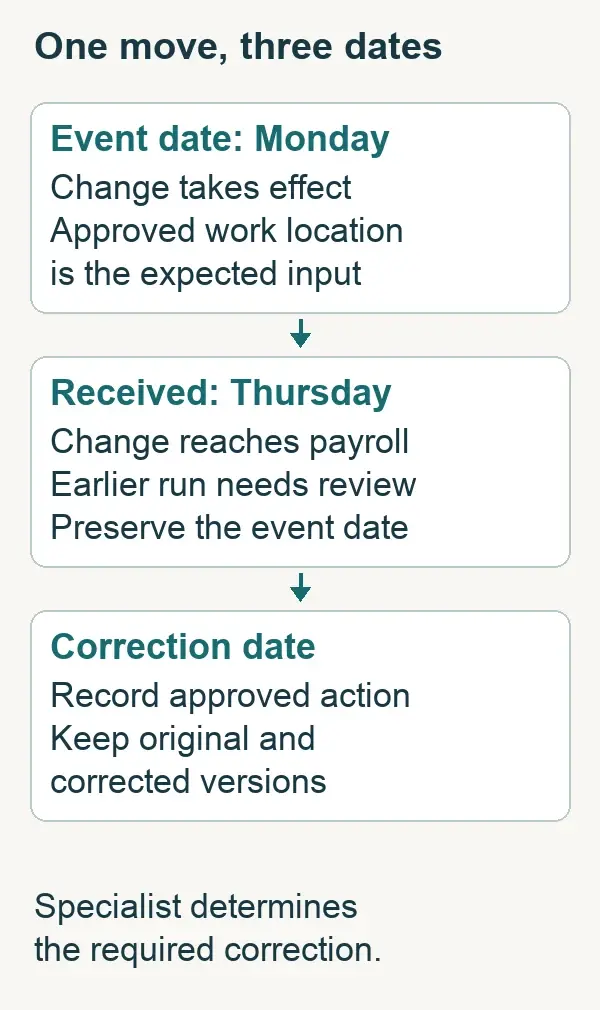
Receiving a change later does not replace the date on which the event occurred.
Test split-location work without inventing a threshold
A permanent move may be easy to demonstrate while changing assignments remain difficult. Give the vendor an approved example in which an employee works at two locations during a pay period. Identify the source that records the work and the expected treatment established by your payroll or tax reviewer.
Ask how the product represents the inputs. Can it retain the relevant work segments, dates or earnings allocation your method requires? Does the information enter through timekeeping, a payroll adjustment, an integration or a separate service request? A manual method can be workable at low volume, but count its preparation and review work.
Request a correction to the sample after the original input has been imported. An amended location entry should have a documented path through the affected payroll record and downstream recipients. Have the vendor show where the amended value appears and explain whether you must rebuild an import or request specialist assistance.
Do not ask a salesperson to establish a universal number of travel days that creates an obligation. The relevant treatment depends on the jurisdiction, facts and applicable rules. Ask your qualified reviewer to supply the approved expected result, then ask the product team whether its proposed workflow can support that result.
Keep unemployment, income-tax withholding, local taxes and wage rules as separate review questions where relevant. A feature that supports one category does not prove that the package handles all the others. A general multistate capability claim is especially unhelpful when the required exception is narrow and consequential.
If the provider cannot reproduce the case during the demonstration, obtain a documented answer from the team that will support the workflow. Give the answer a due date before contracting. An unavailable demo environment is a limitation of the evidence, not automatic proof that the feature is absent or present.
Read provider documentation for the boundary it reveals
Public documentation can help you decide which candidates deserve a meeting. It also exposes questions that a broad product page leaves unanswered. The following are source-based examples checked in October 2026, not hands-on testing or a ranked certification of multi-state compliance.
Gusto: confirm the package and administrator choices
Gusto's multi-state page currently places multi-state payroll in its Plus and Premium plans. Its help documentation says administrators must select the correct settings for reciprocity and describes limitations on local courtesy withholding. Those product instructions are more useful to a buyer than assuming every address combination is handled automatically.
Consider Gusto when your operating team can maintain the approved location information and wants to investigate a defined small-business payroll package. Ask the finalist to demonstrate your specific home/work combination, identify any supported local treatment and put registration assistance and retained work into the proposal. Confirm current terms before buying; do not use a vendor help example as legal advice for your employee.
OnPay: inspect the address and employer-account inputs
OnPay advertises multi-state payroll without an extra state-processing fee. Its Worksites documentation emphasizes its address helper and describes state-specific fields for employer identifiers, rates and other information. These facts support a focused evaluation of how your team supplies and maintains the setup.
Consider OnPay when you want to investigate core payroll processing across your footprint without assuming that every additional service is included. Demonstrate one exact worksite and one approved move, then ask who supplies missing account information and how a rejected or corrected input is handled. A published processing-fee statement is not a complete registration or service quote.
Paylocity: connect the jurisdiction review to the time source
Paylocity publishes multi-state payroll capabilities including configurable payroll audits, tax filings and a connection between payroll and time management. For an employer with recurring location assignments, those claims justify questions about the complete path from recorded work to the payroll review.
Consider Paylocity when your workforce process needs a coordinated time and payroll evaluation and your team can examine the proposed modules and configuration. Ask which audit identifies your chosen location exception, who resolves it and how a time correction reaches the payroll record. Obtain the package, implementation scope and ongoing service duties in writing. Have the implementation team demonstrate the particular configuration you would buy.
These examples illustrate different starting questions. Include another provider if it can address your geography packet convincingly. Shortlist by demonstrated fit and owned work, not by the number of times a product page says compliance.
Find a service model your team can operate. Registration help and location-change support can narrow the shortlist as much as software features. Discuss those needs in a free SelectSoftware Reviews consultation, then check the suggested options against your written requirements and each provider's contractual scope.
Copy the Multi-State Vendor Validation Checklist
Use this checklist once per finalist. Retain the geography packet version, the proposed package and the date of the demonstration. Check a line only when it was demonstrated. Otherwise write 'documented with conditions', 'unresolved' or 'not applicable' beside it. An unchecked line remains visible; do not turn an unanswered material question into a pass.
Candidate identification
Provider, product and package: ______
Employer entities and packet version: ______
Demonstration date and provider participants: ______
Payroll or tax reviewer supplying expected treatment: ______
Required answer date before contracting: ______
Coverage you can identify
☐ Current entities, states and relevant localities appear in the proposed scope.
☐ Residence and work-location information have an explained relationship.
☐ The exact local-address example maps to the reviewed setup.
☐ Unsupported or separately serviced cases are listed explicitly.
Accounts and service work
☐ Registration applications, authorizations and required inputs have named owners.
☐ A pending account has a visible status and an explained deadline response.
☐ Rate or account-detail changes retain an effective date and review record.
☐ Filing, payment, notice and closure responsibilities are allocated.
A change you can trace
☐ The approved move preserves the earlier location and change date.
☐ Source-system mapping carries the information the payroll method requires.
☐ A change after approval triggers an explained review route.
☐ A late correction connects to affected outputs and any separate service task.
Evidence and purchase terms
☐ An administrator and backup can retrieve the relevant history and confirmations.
☐ Permissions separate employee submissions from authorized configuration changes.
☐ The quote prices the required package, registration help and recurring retained work.
☐ Conditions promised during the demonstration appear in the final proposal.
Finalist result: suitable as proposed, suitable if conditions are confirmed, or unsuitable for an essential case: ______
Required conditions, proof owner and latest acceptable date: ______
Reusable location-case record
Copy this record for the move, split-location work or pending-account case that matters most. Keep sensitive identifiers in your secure system and use references in the evaluation notes.
Case and affected employing entity: ______
Original location and proposed location or assignment: ______
Event date, date received and payroll period: ______
Approved expected treatment and qualified reviewer: ______
Product inputs and employer-account prerequisites: ______
Observed output or documented limitation: ______
Provider task, employer task and additional cost: ______
Correction route and retained history: ______
Unresolved question, answer owner and due date: ______
Purchase condition and evidence reference: ______
Use a short written result under each completed case. For example: "The demonstrated package preserves a dated transfer, but the quoted service excludes the new account application. Payroll can own the application if the provider confirms the required inputs and escalation route before signing." That statement distinguishes a supported feature from a manageable service exclusion.
Price the footprint you will operate
Ask each finalist to quote the same current footprint and one realistic expansion event. Identify whether another state changes the package, processing fee, registration service charge, required module or support arrangement. Request the complete charge list and the assumptions behind it.
Include employer labor in the comparison. Estimate the time to collect approved changes, prepare any manual location inputs, follow up on pending accounts and verify filings or notices. Use your own expected frequency and staff costs; do not adopt a generic promise that automation saves a particular percentage.
Examine the difficult month's cost, not only the ordinary month's subscription. A transfer, agency notice and correction occurring together can consume specialist time even when employee count is unchanged. Ask which tasks are included, which require a separately priced service and which remain your responsibility.
Keep the quote tied to its assumptions. If the package depends on using the vendor's time product or on a limited number of employing entities, record that dependency. Compare the full proposed operating arrangement with the effort of keeping an existing system connected. Integration convenience has value only when the data needed for your approved method survives the connection.
Avoid using a low subscription price to settle an unresolved material capability question. First determine whether the finalist can support the required workflow. Then compare the cost of the acceptable options, including manageable exclusions your team has deliberately accepted.
Leave the meeting with conditions someone can fulfill
Classify each finalist using the evidence collected. One may be suitable as proposed. Another may be suitable only if a missing service, documented workflow or package term is confirmed. A third may be unsuitable for an essential case. Keep unresolved evidence distinct from a demonstrated failure so you do not reject or approve a product on an assumption.
Put essential conditions into the buying decision. Name the required result, the person supplying proof and the latest date your employer can wait for it. A promise of a future feature should be treated according to what is available and contractually committed for your implementation, not what might arrive later.
Transfer the accepted geography packet, account responsibility list and location-case records into implementation. They provide concrete acceptance criteria for the team configuring payroll. Before relying on the live setup, have the responsible reviewers validate the actual configuration and affected outputs. A sales demonstration does not approve the first payroll.
If none of the finalists can support the employer-approved treatment with a workable allocation of responsibilities, revise the shortlist or service model. Do not conceal a manual process that no one has capacity to operate. The useful final decision names the package, the demonstrated footprint, the work retained by your employer and the conditions that still govern the purchase.
Explore the Payroll Software Comparisons collection for related buying decisions. The full guide library covers operating controls that follow selection.
Match the purchase to your team's capacity. If the first shortlist leaves too much location or registration work with your team, ask a SelectSoftware Reviews advisor about other payroll options in a free consultation. Verify the final package, scope and costs directly with the selected provider.

About the author
Ben Scott writes and maintains payroll decision guides for founders and operators. His work focuses on execution realities and how decisions hold up under growth, complexity, and controls and documentation pressure. He works hands-on in HR and leave-management roles that intersect with payroll-adjacent workflows such as benefits coordination, cutovers, and compliance-driven process controls.


