Scheduling and Payroll Software: Test the Shift-to-Pay Handoff

Updated: 2 days ago

Ask a scheduling vendor to move one employee's Tuesday shift while you watch what happens to the next payroll preview. The calendar change is only the beginning. You need to see who accepts the replacement, whose actual hours are recorded, which manager approves them and what the payroll system receives. That demonstration reveals more about the purchase than a long feature list.
Choose scheduling and payroll software around the changes your hourly team actually makes. A small shop with predictable coverage may gain enough from the scheduling tools in its payroll package. A business coordinating many roles or locations may need a specialist scheduler connected to payroll. A controlled file transfer can also be workable when the team can sustain its recurring checks. Buy the complete route and its remaining work, rather than assuming one application's name establishes the connection.
This guide helps U.S. employers compare those configurations before signing. It includes six buying trials, a fictional two-store example and a reusable Shift-to-Pay Trial Card. Product examples come from current vendor documentation, not hands-on testing. The pay examples use stated assumptions; your employer's legal obligations, agreements and actual compensation still govern the result.
Contents
Follow a shift beyond the roster
A roster describes intended coverage. Time records describe what happened, and payroll needs the applicable pay treatment. Keep all three visible in the demonstration. Otherwise a vendor can show an attractive schedule and a clean payroll screen without proving how one became the other.
For covered nonexempt employees, the federal recordkeeping rule permits a fixed schedule to support records when the employee actually follows it, but requires the exact hours when actual work differs. Ask how the proposed system preserves that difference. A scheduled eight-hour shift that becomes nine hours cannot remain eight in payroll simply because nobody replaced the original roster entry.
Bring a recent ordinary week and an awkward week, using anonymized or fictional people. Include the changes that consume management time: a shift trade, work at another location, an interrupted meal, a pay-rate change, leave and a corrected punch. Select only cases relevant to your team. A retail employer should not buy restaurant tip features merely to complete somebody else's demonstration script.
For each change, identify the employee, date, job, work location and expected paid result before the vendor touches the screen. Then compare the schedule, actual time, approval record and receiving payroll preview. An unexplained difference is a question to resolve, even when the company total happens to match.
Choose the payroll preview as the endpoint of the buying trial. A successful connection message, a downloaded file or a scheduling report proves a narrower event. None establishes that the intended employee and earning category arrived in the intended pay run.
Decide which system anchors the purchase
Begin with the system you have a good reason to keep. If payroll serves your tax, benefit, accounting and reporting needs, changing it solely to obtain shift scheduling creates a larger purchase than the original problem. Test its available scheduling package and compatible scheduling tools before deciding that payroll itself must move.
If the scheduler is central to coverage, qualifications, location staffing or employee availability, it may deserve to remain the scheduling authority. In that case, require a clear account of what the payroll connection carries and what your team must still enter or verify. A familiar employee app is useful only if the payroll route supports the same people and pay arrangements.
When neither application fits, compare a combined replacement with a specialist combination using the same trial cases. The combined product may reduce handoffs and separate subscriptions. The specialist may better handle operational complexity. Those are reasons to investigate a configuration, not proof that it will handle your work.
Write down the proposed employer coverage as well. Two stores operated by one employer are a different test from two companies with separate payroll accounts. Ask whether a worker can move between locations, which account receives the time and how the configuration treats that worker's workweek. A single scheduling view does not establish a single legal employer or a supported multi-company payroll arrangement.
Three configurations worth putting through the trial
Scheduling inside the payroll package
This arrangement is attractive when the scheduling tasks fit the payroll product and the people managing shifts can use it comfortably. It can reduce separate account maintenance and transfer steps. Verify the purchased plan, manager access, employee experience and location coverage rather than assuming every payroll subscription includes the same time tools.
Gusto's current pricing page lists time tracking and scheduling under Plus. It also lists Time & Attendance Plus, including scheduling, as an add-on available with Simple, so Plus is not automatically the minimum purchase. Its scheduling page describes shift coverage requests that employees offer to eligible coworkers, with manager approval before the schedule updates. Those published capabilities make a useful demonstration starting point; ask the vendor to show the complete path from the changed shift through actual time and payroll in the quoted package.
Homebase presents scheduling, timesheets and payroll together. Its payroll page qualifies the multiple-location single-run feature: locations must have the same EIN, pay schedule and pay frequency. A buyer operating across different entities or frequencies should resolve that boundary before treating an all-in-one demonstration as a fit. The published page is evidence of the offer's scope, not a guarantee about an individual implementation.
A specialist scheduler connected to payroll
This can suit a business that needs more scheduling depth while retaining payroll. Separate the connection's employee direction, time direction, supported categories and timing. Employee creation, leave balances and paid-hour transfer may be different processes with different limits.
Deputy's Gusto integration documentation makes those limits concrete. It requires approved timesheets and explains that changing rates after approval requires unapproving and reapproving for the new rates to apply. It also identifies export exclusions for contractors and non-default leave types. Ask the vendors to demonstrate your affected people and leave policies in the current integration, including how an unsupported item will be handled.
Resolve conflicting or differently worded documentation in the demonstration and written scope. Product pages may summarize a connection while help articles describe particular export methods. Do not infer that a broad integration listing carries every job, rate, leave type or payroll account unchanged.
A scheduler with a controlled payroll export
A file route may be reasonable when its format is supported, exceptions are modest and a named person can check the import before every run. Include file preparation, category mapping, employee matching, version storage and error resolution in the purchase cost. A low subscription price can coexist with substantial payroll work.
Have the proposed operator download the actual export and use the supported receiving process in a safe demonstration environment. Record the selected dates, included people, category totals and receiving result. Ask what prevents the same file being imported twice and how the team distinguishes a replacement from an additional payment instruction.
Choose this route deliberately. If nobody can own those checks, a file export does not solve the handoff simply because both vendors support spreadsheets.

Follow one changed shift to its employee-level payroll result. A transfer acknowledgement is an intermediate event.
Trial 1: trade a shift, then record what was actually worked
Give one fictional employee a scheduled shift and have an eligible coworker take it. Observe the employee notification, manager approval and final roster. Then record a different actual finish time. The employee who worked should receive the appropriate time record, while the absent employee should not acquire worked hours from the original schedule.
Ask which edits remain possible after the trade is accepted. Can the original employee still see the superseded assignment? Can a manager identify who approved the change? Does changing the roster rewrite an already approved time record, or leave an inconsistency that somebody must address? A useful product makes that relationship understandable to the people using it.
Next, add compensable work outside the scheduled interval. For covered nonexempt employees, the federal hours-worked rule includes work the employer suffers or permits, including known work after the scheduled end. A scheduling restriction should therefore create an operational review, not make actual compensable work disappear from the record. Ask how the employee reports the discrepancy and how payroll receives the resolved result.
For a worker who must use a shared clock, include an actual clock or kiosk in the trial. For a worker using a phone, have the employee complete the relevant action on a phone. Check how a failed login, unavailable device or weak connection is reported and corrected. A manager completing every employee action on a demonstration laptop does not establish an employee workflow.
Trial 2: put one employee in two stores during one workweek
Use a person who genuinely works across your locations, or a fictional equivalent. Follow the same identity through both schedules and both time records. Ask the vendor to show the location allocations and the employee's combined payroll result, rather than only location-level totals.
Consider this fictional buying case. One employer operates two stores. A covered, nonexempt employee works 26 hours in the first and 16 in the second during the same established workweek, all at $20 per hour. Assume no bonus, other compensation, special overtime arrangement or additional state or local premium applies. The correct simple federal example has 40 regular hours and two overtime hours: $800 plus $60, or $860 gross.
A configuration that treats each store's hours as an independent overtime test could show 42 straight-time hours and $840. Both location reports can appear internally consistent while the employee is short $20. Ask where the full-workweek hours are combined and which system calculates the overtime result. The federal hourly-rate rule supports the example's calculation; it does not settle different-rate or other compensation cases.
Repeat the trial across your workweek boundary when overnight shifts are common. The employee's established workweek matters; the federal rule does not allow averaging hours between weeks. Verify how a shift crossing that boundary is allocated, especially if the scheduling application and payroll use different date or time-zone settings.
For multiple jobs or rates, supply a separately calculated expected result based on the applicable rules. Do not use the single-rate $860 example as the answer to every scenario. The buying question is whether your proposed setup preserves the facts needed to reach the right employee result, with usable location costing alongside it.
Trial 3: challenge the meal, leave and earning categories
Try a scheduled meal that the employee could not take free from duties. A default deduction can make the hours look neat without answering whether the period was unpaid time. Under the federal meal-period rule, a bona fide unpaid meal requires the employee to be completely relieved of duty. Demonstrate how the employee reports an interrupted meal, who resolves it and how the corrected time reaches payroll.
Add the pay categories your business actually uses. These may include paid sick leave, a custom leave policy, shift differentials, tips, commissions or a location-specific earning code. Ask whether the connection carries hours, amounts, rates or categories, and identify which system applies the treatment. An export that supports regular hours may have a different route for another earning type.
For example, send eight hours of an approved leave category through the proposed workflow and inspect the receiving category and the relevant balance treatment. A matching cash amount alone would not explain a transfer that changed leave into ordinary worked hours. The expected treatment depends on the employer's policy and applicable law; the trial should use that approved treatment, not invent a generic one.
Check scheduling-related pay that may not arise from ordinary clocked hours. California's reporting-time-pay guidance is one example of a state rule connected to reporting for work and insufficient work provided. Its coverage and exceptions need review; it is not a nationwide default. Ask how a required adjustment is identified, approved and entered when the scheduling or time product does not calculate it.
The purpose is to find unsupported work before purchase. A documented manual step may be acceptable if it is practical, assigned and included in the quote. An unrecognized exclusion is more serious because the buyer cannot plan around it.
Trial 4: correct time after the first transfer
First transfer the approved demonstration time into an unsubmitted payroll preview. Then correct one underlying record. Have the vendor show how the correction reaches that same preview and how the operator identifies the version now being reviewed.
Determine whether the next transfer replaces a value, adds another line, rejects a previously sent item or requires a manual correction in payroll. Each can be workable in an appropriate process, but they require different instructions. Ask the operator to explain the action before repeating the transfer. Do not treat a second successful connection message as proof that the first value was removed.
Next, simulate an interrupted transfer or a clear partial rejection. Inspect the people and categories that arrived, those that did not, and the evidence identifying each group. A retry should produce an explainable result without duplicating hours that were already received. If the product cannot demonstrate a safe retry, record the supported recovery process and its owner as an unresolved buying condition.
Ask separately about a correction discovered after payroll is finalized. That is a different event from editing an unsubmitted preview. Identify the receiving payroll product's correction route, required approvals, payment timing and support responsibilities. Your lawful payment obligations remain even when a vendor's preferred workflow or internal cutoff has been missed.
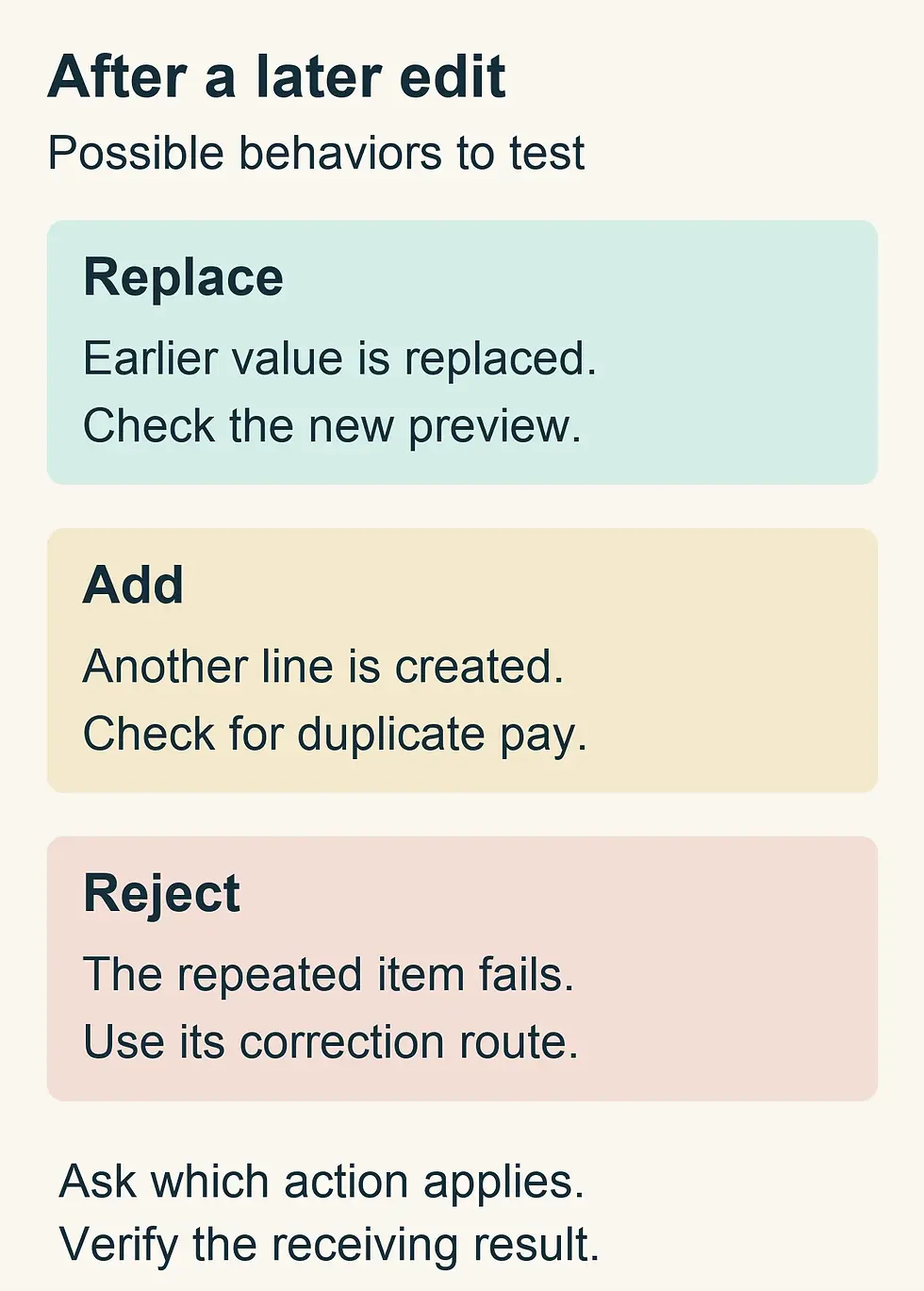
A later transfer may replace, add or be rejected. Ask for the supported behavior and verify its effect before relying on a retry.
Trial 5: use a store manager's actual permissions
Have a store manager, a payroll operator and a backup operator perform their own parts using the proposed roles. A product specialist working as administrator can hide restrictions that the real team will encounter later.
The manager may need to publish shifts, approve a trade and resolve a punch. Ask which pay rates, other locations, personal details and payroll functions that role can see or change. The payroll operator needs enough evidence to review the result without giving every scheduler permission to change compensation or release funds.
Demonstrate an absence. Can an authorized delegate approve the location's time before the cutoff, see the unresolved items and complete the handoff using their own account? Check what happens when the original manager returns. A workaround that depends on sharing credentials or permanently expanding an employee's access should count as remaining work or a reason to decline the setup.
Include the employee's ability to report a problem and the reviewer's ability to retrieve history. Ask for the old value, new value, actor, time and reason on an example change. Decide whether the history can be exported in a usable form and retained when a manager leaves or the contract ends.
Trial 6: finish the work during an ordinary disruption
Take away one convenience: a store's network is down, an employee cannot use the app or the designated operator is absent. Ask the vendor to demonstrate the supported response and the later reconciliation. Do not assume an application has offline capability, a particular outage process or emergency support merely because the sales page describes it as cloud software.
The fallback should preserve the employee's actual work and route it into payroll through an authorized process. Identify how duplicate entry is prevented when the normal connection returns. A screenshot of an unavailable clock cannot by itself tell payroll which hours are owed.
Ask both vendors where support responsibility begins and ends when two applications are involved. Record who diagnoses a rejected employee, a missing earning code, a stale connection and a duplicate transfer. Obtain the channels and service hours in the proposed agreement. A promise that the other vendor will fix it leaves the buyer with an unassigned task.
You do not need to manufacture a production outage or send live payments to run this buying trial. Ask for a safe demonstration, written limitations and the approved fallback procedure. Where the seller cannot show a scenario, keep the result marked unresolved rather than describing an unobserved capability as proven.
Your Shift-to-Pay Trial Card
Copy one card per quoted configuration. Use fictional or appropriately protected test records, and link evidence kept in an authorized location. Write Shown, Manual and assigned or Unresolved for each trial. Shown means you observed the receiving result. Manual and assigned means the vendor identified the supported procedure, your named operator can perform it and its workload is included in the decision. A verbal assurance alone stays unresolved.
Configuration: Scheduling product and plan, payroll product and plan, connection or file route, demonstration date: ______.
Coverage: Employer, locations, worker types, workweek boundary and required pay or leave categories included in this trial: ______.
Shift trade and actual time: Status, employee who worked, original assignment, resolved actual hours and payroll-preview evidence: ______.
Cross-location workweek: Status, shared employee identity, location hours, combined weekly calculation and costing evidence: ______.
Meal and pay categories: Status, tested adjustment or category, receiving treatment, unsupported items and assigned procedure: ______.
Correction and retry: Status, first transfer reference, later change, replacement or addition behavior, partial failure and final receiving result: ______.
Manager and backup access: Status, demonstrated roles, prohibited actions, named coverage and usable change history: ______.
Disruption and support: Status, tested or documented fallback, vendor responsibility, employer action and return-to-normal check: ______.
Comparable cost: First-year and recurring fees, location and employee assumptions, setup charges, recurring manual steps and operator time: ______.
Buying decision: Accept, accept subject to a named demonstration or written condition, or decline; unresolved pay-critical issue, owner and resolution date: ______.
Do not turn these statuses into an average that lets a polished scheduling interface cancel out an unresolved employee-pay problem. A manual route is a conscious operating commitment. Before accepting it, have the person who will do the work explain the evidence, frequency, time and absence coverage. Keep the card with the proposal so the eventual purchase can be compared with the configuration actually demonstrated.
Count the invoice and the work left with your team
Request a quote for the complete configuration at the same employee count, locations, pay frequency and necessary modules. Separate the scheduling subscription, payroll subscription, time capture, integration, hardware, implementation, training and any location-based charges. Ask how active employees, seasonal workers and additional payroll accounts affect the bill.
Calculate the first year separately from the recurring year. A temporary discount, free setup or a waived device charge can change the first invoice without changing the long-run choice. Record renewal terms, minimum commitments, cancellation conditions and the cost of retrieving records. Use the actual written quote instead of carrying forward a price from an old comparison article.
Then price the work demonstrated in the trial. Suppose a fictional team identifies 25 minutes of recurring export preparation and checking in each of 26 payroll runs. That is 650 minutes, or about 10.8 hours annually, before corrections and absence coverage. At an illustrative internal labor cost of $35 per hour, it represents about $379 of work. These are calculation assumptions for your comparison, not measured vendor savings or a quoted service price.
The same exercise can identify work eliminated by a new configuration, but count only a task you can reasonably expect to remove. If somebody still needs to compare the payroll preview, do not book that review time as a saving simply because the import becomes automatic. If a specialist scheduler prevents operational rescheduling work, evaluate that benefit with the managers who perform it, separately from payroll time.
A lower-cost package can be a good choice when its limits are visible and the team can manage them. A higher-cost package can be justified by a demonstrated capability the business actually needs. Avoid paying for broad automation claims while leaving the hard cases outside both contracts.
Choose from the demonstrated limits
For a small, stable team, start with the scheduling option in the payroll product you would otherwise keep. Proceed when the required employee actions, pay categories and manager permissions work in the quoted package. A second application needs a reason beyond a more attractive calendar.
For operationally complex staffing, favor a specialist when its scheduling advantages matter and the payroll connection survives your changed-shift, category and correction trials. Accept the integration's exclusions only with a supported procedure, an accountable person and a realistic recurring cost. An unresolved pay-critical transfer is a reason to keep the proposal conditional or choose another configuration.
For a controlled export, require enough staff capacity and evidence to operate it reliably. It may be a sensible purchase when the workload is small and predictable. It becomes a weaker fit when locations, exceptions or operator absence repeatedly overwhelm the checks that make the route safe.
Carry the trial's conditions into implementation acceptance. Preserve the product plans, supported connection, worker coverage and documented manual steps that the decision relied on. Ask the actual operator to repeat the relevant cases before the first live run, using the agreed setup. When a candidate cannot explain how a changed shift reaches the correct person in payroll, you have a concrete reason to keep looking.
Browse the Decision Guides library.
Continue with Payroll Software Comparisons.

About the author
Ben Scott writes and maintains payroll decision guides for founders and operators. His work focuses on execution realities and how decisions hold up under growth, complexity, and controls and documentation pressure. He works hands-on in HR and leave-management roles that intersect with payroll-adjacent workflows such as benefits coordination, cutovers, and compliance-driven process controls.