
Payroll Gross-Ups: Define the Net Promise Before Calculating

Updated: 2 days ago

“Make sure the employee receives $1,000” leaves payroll with an unanswered question: $1,000 after which deductions? A payment can meet a promise after federal withholding and still fall short after Social Security, Medicare, a retirement election or an applicable local tax. The calculation cannot settle an agreement that the employer has not defined.
A payroll gross-up increases gross compensation to produce an agreed result after specified employee taxes or deductions. Start by writing the promise in terms that a payroll preview can test. Then calculate the added wages, check the employee's current tax bases and compare the resulting net payment with that promise. Keep the employer's own taxes and other costs in a separate budget calculation.
This guide is for U.S. payroll, HR and finance teams approving a cash gross-up for an ordinary employee. It includes worked 2026 federal examples and a reusable Net-Pay Promise and Gross-Up Verification Sheet. Household and agricultural employer-paid tax arrangements, cross-border tax equalization and a promise to cover someone's final personal tax bill need their own treatment; the ordinary examples below do not resolve those arrangements.

If net-pay commitments keep producing manual adjustments, bring your payment types, deduction rules and gross-up examples to SelectSoftware Reviews. Its free advisor consultation and payroll software matching can help you explore providers; ask each proposed provider to demonstrate the exact net-to-gross calculation and review evidence your team needs.
Contents
Write down what the employee is meant to receive
Separate three decisions that often arrive in the same message: the reason for the compensation, the amount the business authorizes and the deductions the employer intends to absorb. A bonus approval can establish the first two while leaving the third unresolved. Ask the compensation owner to resolve that boundary before payroll interprets an informal instruction as a continuing promise.
An operational instruction might read: “For this payment, provide an additional $1,000 of cash after applicable employee federal, state and local payroll tax withholding. Ordinary benefit deductions remain unchanged, and the company is not covering the employee's final income-tax liability.” That is a proposed scope to review with the appropriate HR, tax and legal owners, not a contract clause that fits every employer.
Identify whether the promise applies to a separate payment or the increase in a combined paycheck. If ordinary take-home pay is $2,400, an additional $1,000 promise may require a final $3,400 result under otherwise identical inputs. A request for a total $1,000 paycheck is a different instruction. Record which comparison the reviewer will use.
Also distinguish an exact net commitment from a fixed allowance for taxes. An employer may authorize $1,000 plus a fixed $300 tax allowance. That creates a $1,300 gross payment under those terms; it does not automatically produce $1,000 net. Describe an estimate as an estimate, and identify whether anyone has authorized a later true-up. Do not silently expand a capped allowance into an unlimited commitment.
Keep payroll withholding separate from a personal tax guarantee
Federal withholding is a payment toward the employee's tax, as explained in IRS Publication 505. A paycheck calculation does not establish the employee's eventual return liability. Other income, filing circumstances, credits and payments can change the annual result.
Consequently, “net after the withholding on this payment” and “no additional tax from receiving this benefit” are different promises. The second may require a separate tax-equalization agreement, a defined return calculation, access to sensitive information and a later settlement. Route such a promise to the employer's tax advisers and authorized compensation decision-maker rather than inventing an employee marginal tax rate in payroll.
Decide how employee-requested additional withholding is treated within the promise. Increasing a gross-up to offset an extra withholding election can increase employer cost without changing the underlying compensation reason. Excluding it from the promise does not authorize payroll to disregard a valid withholding instruction. Form W-4 tells the employer what inputs to use; the business must describe the promised result consistently with the actual withholding process.
Give employees a plain explanation of the payment, its date and the boundary of the company's commitment. Avoid saying the bonus is “tax free” because the company increased gross wages. For a withholding-based arrangement, explain that the employer is funding additional compensation to achieve the specified payroll result, while personal return questions remain separate.
Establish the tax bases before adding the rates
Confirm that the original item is taxable compensation and determine the applicable wage bases before calculating a gross-up. A reimbursement that qualifies for exclusion needs a classification decision, not an automatic wage increase. A taxable noncash benefit needs an approved value and collection method before a cash tax allowance is calculated.
For an ordinary employee, paying the employee's Social Security and Medicare taxes on their behalf generally creates additional taxable wages, which themselves generate more employee tax. Publication 15-A's employer-paid employee tax instructions describe that recursive effect. Adding the first tax estimate once will usually miss the intended result.
For 2026, employee Social Security is 6.2% up to the year's covered wage base; ordinary Medicare is 1.45% without that wage cap. The SSA annual table lists a $184,500 Social Security base for 2026. Use the year of the actual wage payment, including the correct year-to-date balances, rather than carrying these example inputs into a later year.
Keep income-tax wages, Social Security wages and Medicare wages separate when their bases differ. Record applicable state and local treatment from the correct jurisdiction's guidance and the employee's actual work and residence facts. A combined percentage is valid only when each included percentage applies to the same incremental amount over the entire calculation.
The household and agricultural exceptions matter here. Publication 15-A excludes those employers from its ordinary employer-paid employee FICA discussion. Do not apply the ordinary recursive FICA example to a nanny or farm worker merely because a system offers a gross-up button. Establish the applicable arrangement and reporting rules first.
Select a lawful withholding method for the payment
A gross-up is not permission to choose a convenient federal withholding percentage. For separately identified supplemental wages within the relevant $1 million limit, the optional 22% method generally requires federal income tax withholding from regular wages in the current or immediately preceding calendar year. The aggregate method is another route; when that regular-wage withholding condition is absent, the aggregate method applies. See Publication 15, section 7.
Where the aggregate method applies, payroll needs the relevant regular and earlier supplemental wages and withholding, not just the proposed bonus. A flat calculation based on the employee's assumed personal tax bracket does not reproduce that method. Save the method used and the data that support it with the preview.
Supplemental wages above $1 million in the calendar year require 37% federal withholding on the excess, with payments from businesses under common control included in the threshold test. The gross-up can itself move the supplemental total across that boundary. Do not test only the original net award against the limit.
Employee Social Security and Medicare remain separate calculations. IRS Topic 751 also identifies 0.9% Additional Medicare withholding on wages an employer pays above $200,000 in the calendar year, regardless of filing status. That threshold is different from the $1 million supplemental-wage threshold and from the Social Security wage base.
Calculate a constant-rate example from gross back to net
Assume a fictional $1,000 additional cash promise covers only federal income tax withholding and employee FICA. The payment qualifies for the optional 22% supplemental method, the employee remains below the Social Security wage base and Additional Medicare threshold throughout, and no state, local or other deductions apply. These assumptions deliberately simplify the example; they are not a default configuration for employees generally.
The combined employee rate is 22% + 6.2% + 1.45% = 29.65%. When those rates apply to the same full wage increment, the starting calculation is:
Gross payment = promised net / (1 minus combined employee rate).
Here, $1,000 / 0.7035 gives $1,421.46 after rounding the proposed gross to cents. Recalculate each withholding component on that gross and round each amount to cents for this example:
Gross wages: $1,421.46.
Federal income tax withholding at 22%: $312.72.
Employee Social Security at 6.2%: $88.13.
Employee Medicare at 1.45%: $20.61.
Net cash: $1,000.00.
The employee deductions total $421.46, so the cash result agrees. The gross-up is the $421.46 increase above the original $1,000 amount, while the total gross payment is $1,421.46. Distinguish those labels when sending amounts to someone else or importing a payroll file.
Adding 29.65% once would instead produce $1,296.50 gross and approximately $912.09 net under the same component rounding. The additional allowance is also taxed. This is why “add the taxes” and “solve for the intended net” can produce different answers.
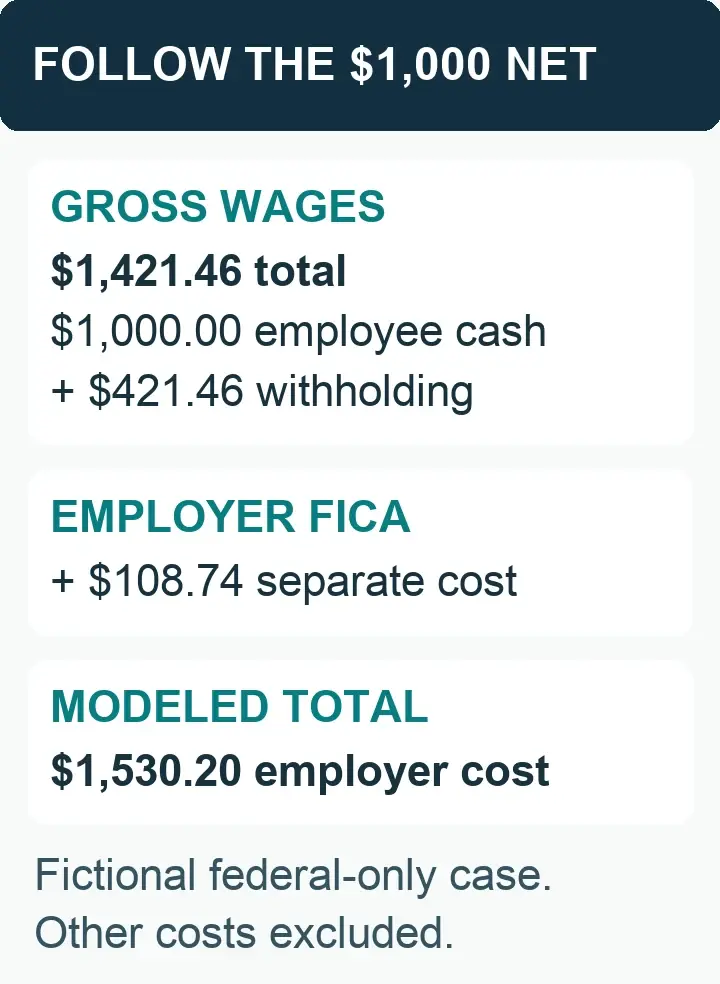
The example's gross wage amount includes employee withholding. Employer FICA is additional employer cost; it is not another deduction from the promised employee cash.
For a contrasting partial arrangement, suppose the company covers only the 22% federal income tax withholding. The corresponding $1,282.05 gross produces $1,000 after federal income tax withholding, but employee Social Security of $79.49 and Medicare of $18.59 reduce actual net cash to $901.92. That matches a federal-income-tax-only boundary, not a promise of $1,000 take-home pay. Have the approver resolve that difference before communication.
Recalculate when a threshold divides the payment
Now keep the full $1,000 federal-only net promise, but assume the employee already has $183,900 of 2026 Social Security wages before this payment. Only $600 of Social Security wage base remains. For this example, the complete gross-up crosses that remaining base, so employee Social Security on the increment is capped at $600 × 6.2% = $37.20.
Federal income tax withholding at the assumed 22% and ordinary Medicare at 1.45% still apply to the full increment. The employee remains below the Additional Medicare threshold. The calculation becomes:
Gross payment = ($1,000 + $37.20) / (1 minus 0.22 minus 0.0145).
That gives $1,354.93 gross, $298.08 federal withholding, $37.20 employee Social Security and $19.65 employee Medicare, leaving $1,000.00 net. Check that the resulting gross really exceeds the remaining $600 base; otherwise the assumed capped calculation would be the wrong branch.
The earlier constant 29.65% calculation would overstate the wages needed in this case. A prior paycheck, another payment in the run or a corrected year-to-date balance can move the boundary. Capture the balances after other applicable wages are taken into account, and confirm how the payroll engine orders entries within the run.
Additional Medicare creates a different split: the 0.9% withholding applies only to the amount above the employer's $200,000 threshold. The IRS Additional Medicare questions and answers explain this payment crossing and the absence of an employer match. A system may need to solve more than one boundary in the same payment; adding 0.9% to every dollar can be wrong too.
Use the payroll engine's supported iterative calculation when rates, wage bases or deductions change as gross wages increase. Retain inputs and the final component breakdown, and independently test the result. An unexplained number of iterations is not useful review evidence; an amount that can be traced from approved inputs to the specified net is.
Include deductions without redefining the promise
Determine whether the earnings code is included in compensation for retirement deferrals and employer contributions. The IRS plan-compensation guidance requires the plan's applicable definitions to be followed. Do not turn off a deduction or match merely to force a desired net amount.
A percentage deduction can change as gross wages change; a fixed deduction may already be taken on the regular paycheck. Confirm caps, arrears and the relationship between regular and off-cycle runs. A worksheet that subtracts the same fixed amount twice can inflate the gross-up while still appearing to balance internally.
For a promise after taxes but before voluntary deductions, display both the after-tax amount and the actual cash payable. For a promise that expressly absorbs specified deductions as well, include their actual treatment in the calculation and authorize the larger employer cost. The words “all deductions” deserve particular review when a future election could increase the payment.
Garnishments and support orders require their own handling. DOL's CCPA guidance explains that bonuses can be earnings and that disposable earnings are calculated using legally required deductions, not simply every deduction shown on a statement. Determine the applicable order, limits and state rules; a private net-pay promise does not let payroll suppress required withholding.
Also review regular-rate implications for covered nonexempt employees. DOL's bonus guidance in its Field Operations Handbook explains that bonuses without an exclusion belong in the regular rate. Have the responsible wage-and-hour reviewer determine the treatment of the underlying award and additional compensation, including any required overtime adjustment; the name “tax allowance” does not make that analysis unnecessary.
Compare two versions of the same payroll
For a combined paycheck, retain an otherwise identical calculation without the gross-up payment and the final calculation with it. Compare gross wages, each tax, each deduction and employee cash. This isolates the incremental result when the payroll engine calculates withholding across the whole payment.
If the baseline net is $2,400 and the otherwise identical final net is $3,400, the cash increment is $1,000. If the baseline changes because of new hours, a benefit correction or an updated withholding election, rerun the comparison with those same inputs in both versions. The old baseline no longer establishes what the gross-up added.
For a separate check, identify any deductions taken elsewhere and any tax history imported from another run. Review the separate check's result together with the regular payroll when the promise depends on their combined effect. Do not assume “off-cycle” means deductions or cumulative wage bases disappear.
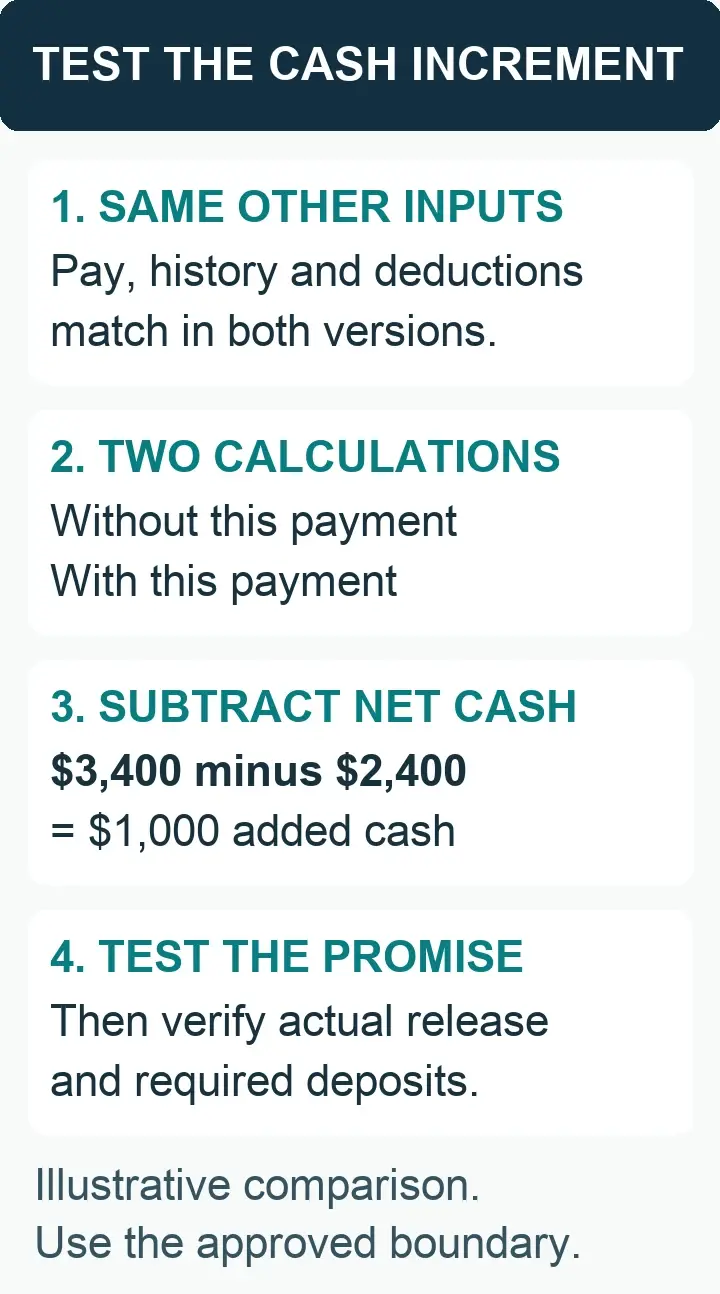
Use the same employee facts in both calculations. A changed baseline can make an apparently correct net difference unreliable.
A calculator outside payroll can provide a reasonableness check, but it must use the same pay date, jurisdictions, wage histories, method and deductions. A mismatch is a question to investigate, not evidence that the payroll engine should be overridden. Reconcile the component where the two calculations diverge.
Preserve the reviewed run version. If someone changes another pay item or regenerates the payroll after approval, confirm whether the affected calculation still agrees. Approval of a screenshot from an earlier preview does not establish the released payment.
Take these requirements into a payroll software conversation
Use your net-pay promise and test calculations to explain gross-up requirements to SelectSoftware Reviews when comparing payroll systems. Verify the calculation options and deductions directly with each prospective provider.
Budget employer cost without counting withholding twice
In the first example, the employer funds $1,421.46 of gross wages. That amount is divided between $1,000 paid to the employee and $421.46 of employee withholding. Adding both gross wages and the same employee withholding again would double count part of the payment.
Employer Social Security and ordinary Medicare are additional costs. At the same uncapped example rates, those employer shares are $88.13 and $20.61, so the modeled gross-plus-employer-FICA cost is $1,530.20. IRS withholding-rate guidance distinguishes the employee and employer shares. The example excludes unemployment taxes, other jurisdictional charges, benefits, provider fees and any related overtime cost; it is not an all-in quote.
For the wage-base-crossing example, employer Social Security is $37.20 and employer Medicare is $19.65, giving $1,411.78 before other costs. The employee's year-to-date position therefore changes the employer budget as well as the gross amount needed.
Keep a compensation cost view and a funding view. A provider debit may include other employees, tax deposits or fees, while a direct employee transfer may cover only net cash. Identify the wage expense, employer charges, withholding liabilities and disbursements so finance can explain the result without treating the gross-up as an unclassified processing fee.
If the approved cost cap cannot support the promised result, return the issue to the authorized decision-maker. Record the revised commitment or additional funding approval. Do not lower required withholding, omit a deduction or reduce an already owed payment to fit an internal estimate.
Use the Net-Pay Promise and Gross-Up Verification Sheet
Copy these fields into the employer's controlled workspace for one employee and payment. Store private supporting material behind restricted evidence links. Complete the promise section before calculation, then use actual payroll outputs to finish the comparison and disposition. The sheet documents an approved treatment; it does not decide unfamiliar tax or contract questions.
Promise and authority
1. Payment identity: Record the employee identifier, employing entity, compensation reason, payment date and any original payment being replaced.
2. Promised amount: State the currency and amount, and whether it is an additional cash increment, a separate check or the total paycheck.
3. Covered reductions: List each included tax or deduction and each exclusion. State how additional withholding, voluntary elections and required orders are handled.
4. Commitment boundary: Identify exact net, estimated allowance or capped support; record any true-up terms and whether personal annual tax liability is excluded.
5. Authority and budget: Link the approved compensation instruction, cost authority and any tax, benefits or legal determination needed for the arrangement.
Promise note: unresolved wording belongs with the authorized owner. A preparer should not infer broader coverage from an unexplained request for net pay.
Employee facts and calculation
6. Tax jurisdictions: Record applicable federal, state and local treatment, work and residence facts, and the sources or approved decisions used.
7. Wage histories: Record relevant Social Security, Medicare and supplemental-wage balances, the payment year and other wages affecting the same run.
8. Withholding method: Record the federal method and its eligibility evidence, applicable certificates and the state/local methods actually used.
9. Deductions and related pay: Record code eligibility, percentage or fixed deductions, caps or arrears, required-order handling and any overtime determination.
10. Calculated wages: Record the proposed total gross increment, the gross-up portion, every employee withholding/deduction component and the calculated cash result.
Calculation note: show a split wage base or changing deduction explicitly. A combined rate needs a common basis throughout the amount being solved.
Net comparison and employer funding
11. Baseline version: Identify the calculation without this payment and its gross, component taxes/deductions and net, using the same other employee inputs.
12. Final version: Identify the reviewed run/version with this payment and record the same outputs, including explained effects on other pay.
13. Promise test: Subtract baseline cash from final cash where relevant, or test the approved separate-check boundary; record the promised amount and difference.
14. Employer cost: Separate gross wages from employer taxes, contributions, fees and other approved costs; compare the total with the authorized budget.
15. Cash and deposits: Identify employee disbursement, withholding remittance, employer-charge funding, responsible parties and required payment/deposit dates.
Funding note: employee withholding is already part of gross wages. Reconcile its remittance without adding it a second time to compensation cost.
Release and follow-through
16. Review decision: Record the reviewer, approved version, residual rounding difference if any, and the explanation of how the actual result meets the agreed boundary.
17. Employee explanation: Link the communication identifying the payment, pay date, expected cash result and limits of the employer's commitment.
18. Actual result: Match the released register, employee payment, tax liabilities and accounting record to the approved version; identify any superseded entry.
19. Correction or closure: Name each unresolved issue, owner and required evidence, or record closure after the actual result and required follow-through reconcile.
Release note: a calculation pass does not establish bank receipt or completed tax deposits. Preserve those separate outcomes and follow their actual deadlines.
Resolve differences by changing the right input
When net cash misses the promise, first identify whether the problem is the agreement, input data, calculation or released payment. A forgotten local tax needs a jurisdiction correction; a duplicated fixed deduction needs a deduction correction; a payment that already settled needs a payment investigation. Increasing gross again before diagnosing the cause can compound the error.
For a rounding difference, inspect component rounding and the final cash result at the payroll engine's supported precision. Recalculate any adjusted gross and retain the final review. Do not delete a tax line or insert an unsupported net adjustment simply to make the worksheet equal zero. An exact net promise requires a supported result or an authorized resolution of the remaining difference.
If an error is discovered after payment, preserve the original run and determine the applicable payroll correction, deposit and employee recovery rules before processing a replacement or deduction. Publication 15's adjustment instructions distinguish current-year withholding corrections from other situations. A new payment in a later calendar year needs that year's treatment; copying the old gross amount is not a recalculation.
Introduce a new gross-up code with documented examples that exercise its actual boundaries: below the wage base, across a threshold, a deduction change and the intended combined-check or separate-check route. Ask the provider to show the input history and final component output. Record what was demonstrated and any unresolved limitation, rather than calling the feature accurate because the preview displays a target net field.
Questions about net-pay commitments
Is a gross-up the same as a bonus?
No. A bonus describes compensation; a gross-up describes increasing gross wages to achieve a defined result after covered reductions. A bonus may be paid as a fixed gross amount or under a net commitment. Approve both the compensation and the scope of any gross-up.
Can every employee use the same gross-up percentage?
Only when the relevant calculation assumptions really match. Wage-base room, withholding method, jurisdictions and deductions can change the amount needed. Use employee-specific current inputs and verify the actual payroll result rather than applying a group percentage because the intended net award is equal.
Does a gross-up guarantee no tax due at filing?
A payroll withholding gross-up does not establish annual personal tax liability. Covering final liability is a different commitment requiring its own approved terms and tax calculation. Explain the withholding-based boundary to the employee before treating the payment as settled.
Should employer payroll taxes be included in the divisor?
Employer taxes are additional employer costs, not employee deductions in the net-pay equation. Calculate the employee result from the covered reductions, then calculate the applicable employer charges separately. If the company also bears employee tax, that compensation must receive its proper wage treatment.
What if the system cannot reproduce the promised net?
Resolve the unsupported method, missing input or ambiguous commitment with the provider and authorized owners before treating the result as approved. A reviewed manual calculation may be appropriate if it can be implemented and reconciled correctly. Keep any wage-payment deadlines and required tax treatment in view while resolving the exception.
Ready to discuss payroll options?
If software limitations are affecting your gross-up process, take the completed verification sheet to a SelectSoftware Reviews advisor conversation. Keep approval of the net promise and tax assumptions with your own team.
Explore related payroll resources:

About the author
Ben Scott writes and maintains payroll decision guides for founders and operators. His work focuses on execution realities and how decisions hold up under growth, complexity, and controls and documentation pressure. He works hands-on in HR and leave-management roles that intersect with payroll-adjacent workflows such as benefits coordination, cutovers, and compliance-driven process controls.


