
Gusto vs Paychex: What Support and Service Are You Buying?

Updated: Oct 11

A payroll administrator needs help with an approved time correction before submission. The owner wants someone to take payroll administration off her plate. Both ask for “better support,” but they are buying different things. A quick answer can help the administrator finish a task. The owner also needs an agreement that assigns the recurring task to the provider.
For a team that plans to keep operating payroll, Gusto's published plans make it straightforward to price the support level alongside the software. A Paychex proposal needs closer attention to the work it assigns to the service, especially if your team cannot reliably perform that work. Gusto also offers dedicated account support, and Paychex offers different levels of customer support and setup assistance. Neither brand name settles how much work you hand over.
This comparison is for U.S. employers buying employee payroll. It uses public vendor documentation checked October 5, 2026, rather than hands-on product testing. It compares ordinary payroll offerings; a Paychex PEO arrangement needs a separate contract and responsibility review. The aim is to choose a support and service package your company can actually use.

Build a shortlist around the work you need covered. In a free SelectSoftware Reviews advisor consultation, discuss the support and service scope you need from a payroll provider. Bring the tasks you want to hand over and the responsibilities your team will keep.
Put a current package name on each proposal
For this decision, compare the Gusto plan and the specific Paychex package being offered. Paychex Flex is the platform name; the package and service items in the quote identify the support arrangement you are buying.
Gusto's current employee plans are Simple, Plus, and Premium. Its plan documentation identifies Simple for single-state payroll, Plus for multi-state payroll with time tracking, and Premium for a dedicated account partner and broader HR support. Basic phone and chat support operates during business hours; the Help Center is available around the clock. Establish which channels your proposed plan provides before relying on them.
Paychex's current payroll comparison page lists Basic, Foundations, Advanced, and Complete, each with a request for pricing. It separately describes online, enhanced, and premium customer support, plus self, assisted, and managed setup. Those are meaningful differences to investigate. Ask the representative to mark which support and setup services are included in your exact proposal and which cost extra.
Do not carry an old Select, Pro, or Enterprise label from an earlier comparison into a new purchase without confirming the current offering. Do not assume that the lowest Paychex package includes every service described elsewhere on the site. Equally, do not compare a basic Gusto subscription with a Paychex proposal containing substantial implementation assistance and call the difference a software premium.
Write a one-line purchase description before the demo: “We are comparing Gusto Plus with Priority Support against this Paychex package, including these setup and service items.” If the description changes, update the comparison. A broader payroll provider requirements rubric can hold your requirements, while the cases below examine the service promises that matter specifically here.
Separate an answer, a resolved case, and a completed task
Use these three levels when a salesperson says the service will help your team. They describe different outcomes, not a ranking of vendors.
Get an answer. Someone explains a setting, a report, or the next step. Evidence might be a documented instruction your administrator can follow. This is useful when your team has the authority and time to finish the work. It is insufficient when nobody internally can do what the answer requires.
Resolve a case. Someone coordinates the investigation until an identified problem is closed. Evidence should include a case owner, the next action, a deadline, and the result. A friendly first response does not show that the issue will survive a handoff between payroll, benefits, and another team.
Complete a task. A defined service performs an agreed job, subject to your inputs and approvals. Evidence is a written scope identifying the deliverable, who authorizes it, and how completion is shown. A dedicated contact may advise on approved changes, corrections, or filings while leaving those tasks with your team. The agreement needs to identify any work the service will actually perform.
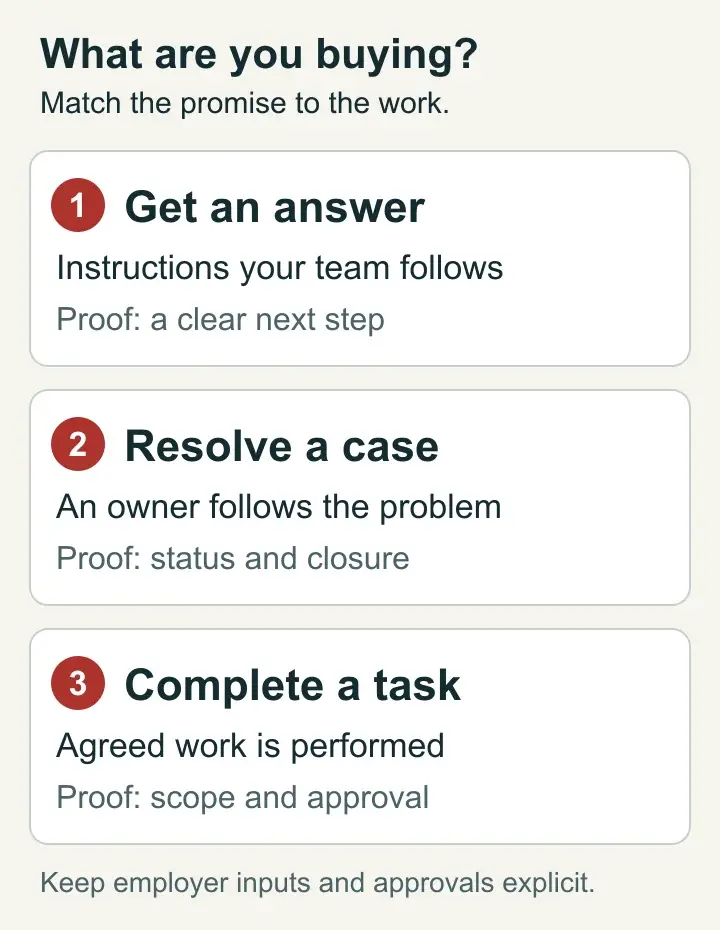
Match the service promise to the work you need handed over.
Gusto's current HR services documentation illustrates why the distinction matters: HR experts provide guidance but do not complete state forms on the company's behalf. Advice can be valuable without replacing administration. Apply the same distinction to every Paychex proposal instead of assuming that a named specialist is an outsourced payroll department.
Your payroll ownership model should identify the people who still approve time, rates, deductions, and funding. The provider's task list belongs beside that internal list. A gap between them is work nobody has accepted.
Judge support against the moment you need it
Support availability has value only in relation to your payroll schedule and the problem you are asking someone to solve. A team that prepares payroll two days early has a different exposure from a team whose managers release time at the last possible moment.
Choose a real submission deadline, in a named time zone, for the comparison. Then ask: “If an approved change arrives one hour before this deadline, which channel do we use, what can the person do, and what is the fallback if it cannot be completed?” Record the answer for the proposed package rather than the vendor generally.
Paychex's customer service form says clients can expect contact within four hours and offers chat for immediate assistance. That is a contact expectation for that route, not a promise that every payroll problem will be resolved within four hours. Ask which urgent-payroll route applies to your account and whether a different service commitment is in the agreement.
Gusto's payment-speed guidance says faster options depend on the applicable eligibility conditions; instant pay will not appear on every payroll. A faster support response cannot guarantee a usable payment route after you miss a submission deadline. Confirm the options your account can use, including costs and what happens if the faster route is unavailable.
Use a payroll cutoff exception log to see how often your team actually needs an emergency route. Separate late approvals, incorrect source data, access problems, and provider defects. A priority channel may reduce waiting for assistance. It will not make a manager approve hours earlier or supply missing bank funds.
The most useful support question is often about continuity: “After the first agent sends the case elsewhere, who follows it through?” Ask whether the next team sees the prior evidence, how you learn its status, and who can escalate it. Treat the replies as proposed service terms to verify, not proof of measured performance.
Price the support level you intend to use
Gusto publishes monthly employee-plan pricing: Simple is $49 plus $6 per person, Plus is $80 plus $12, and Premium is $180 plus $22. Priority Support for Simple or Plus is listed at $30 plus $3 per person monthly. These figures were checked October 5, 2026; confirm the price and applicable extras for your purchase.
For 20 billable people, the illustrative monthly totals are $169 for Simple, $320 for Plus, and $620 for Premium. Priority Support adds $90, making Plus with that add-on $410. These are plan calculations, excluding wages, payroll taxes, benefit premiums, and other services. They are not equivalent packages or a recommendation to buy the least expensive one.
Paychex requests a quote for its current packages. Obtain a written price for the support and service scope you actually need, including setup and recurring extras. There is no defensible universal dollar gap between Gusto and Paychex without that matched proposal.
Use the payroll service pricing worksheet for a full annual comparison. Keep recurring provider fees, one-time setup, optional services, and internal labor separate. A vendor bill is money spent; time saved is an estimate until the workflow changes and your team observes the result.
For example, suppose one hypothetical proposal costs $150 more per month and promises to remove a task consuming four staff hours a month. At an assumed $40 hourly labor value, that work represents $160. This does not prove a $10 saving. Your team may still gather inputs, approve results, and review exceptions, and saved time may create capacity rather than reduce payroll expense. Recalculate using the actual remaining work.
A more expensive service can be sensible when it removes a fragile dependency on one person or gives an important case a dependable owner. Pay for the specific reduction in exposure. Do not attach a fictional dollar value to “peace of mind” to make a preferred proposal win.
Put the same service requirements in front of each finalist. A free SelectSoftware Reviews advisor consultation can help you explore payroll providers for your workforce and support needs. Keep the task list consistent so the proposals answer the same purchase.
Use a service-scope case worksheet before signing
Take the six cases below to both finalists. Replace the examples with your own recent incidents, using anonymized records. For each case, capture the proposed package, employer owner, provider owner, next step, completion evidence, additional fee, and anything the vendor has not established.
Mark each answer as explained, documented in scope, or unconfirmed. A verbal explanation can help you understand the process. It should not be treated as a contractual promise. For a task essential to your purchase, require the proposal or service agreement to identify it. These cases are an evaluation method, not reported tests of either provider.
Case 1: Approved hours change near submission
Situation: A manager corrects four hours after payroll has been prepared but before the agreed submission deadline. The correction is approved, yet the original file has already been imported.
Ask Gusto: In our proposed plan and connected time setup, how does the administrator apply this correction, recheck the preview, and obtain help if the data does not update? Which steps remain ours?
Ask Paychex: In this package, does the service explain the correction or perform any part of it after our authorization? What is the last usable window, and who confirms that the revised hours reached payroll?
Keep as evidence: The correction path, named time zone, required approval, and revised payroll preview. Have the pre-payroll time validation process identify who checks the changed hours before release.
Decision effect: If your team can reliably make and review the change, assistance may be enough. If it needs someone else to act, an explanation of the screen does not meet the requirement. Reject an unsupported promise of “we can always fix it before payday.”
Case 2: A tax notice concerns a prior period
Situation: The company receives an agency notice about a period before the proposed service started. The owner wants the new provider to make the problem disappear.
Ask Gusto: Which notice-related tasks are covered, what records do we supply, and does the prior period fall within that service? Who handles any action outside the coverage?
Ask Paychex: Does the proposed agreement include investigation, agency contact, a prior-period correction, or only guidance? Identify authorization, fees, exclusions, and the person responsible for tracking the notice deadline.
Keep as evidence: The notice, prior filing and payment records, service boundary, employer reviewer, and closure evidence. Do not equate opening a support ticket with an agency resolving the matter.
For ordinary outsourced payroll, the IRS states that the employer remains responsible for federal tax deposits and payments and should independently verify payments through EFTPS. Do not assume the payroll service purchase transfers that responsibility.
Decision effect: A provider that clearly excludes prior periods gives you actionable information. A vague promise to handle “taxes” gives you less. Choose with the uncovered work and required specialist help included in the decision.
Case 3: The only administrator is unavailable
Situation: Your payroll lead is unexpectedly absent on submission day. A backup knows the company but lacks the right account access and has never completed the review.
Ask Gusto: Demonstrate which permissions the backup needs to prepare or submit payroll, how access is authorized, and what support can assist without bypassing the employer's approval process.
Ask Paychex: If a specialist normally helps this account, who covers that specialist's absence? What can the service do while your company supplies an authorized approver, and what cannot proceed?
Keep as evidence: A named backup, a permitted-access test, the approval route, and a provider escalation contact. Payroll access and segregation rules should prevent the contingency plan from becoming a shared password or uncontrolled bank-change route.
Decision effect: Dedicated help is more valuable when coverage survives the absence of one person. The buyer still needs a workable employer authorization path. If neither proposal closes that gap, fix the gap before calling either service a continuity solution.
Case 4: A benefit deduction does not match the election
Situation: A worker's deduction differs from the approved benefits election. Payroll, the broker, and benefits administration each suggest that another party needs to investigate.
Ask Gusto: For our actual broker and benefits arrangement, where does the authoritative election come from, who investigates a discrepancy, and which changes require our approval?
Ask Paychex: Which payroll and benefits services are in this proposal? Who coordinates a case crossing those services, and who remains responsible if an external broker or carrier is involved?
Keep as evidence: The election and effective date, payroll deduction, responsible case owner, and authorized correction trail. Benefits-to-payroll ownership should establish whose evidence controls the change.
Decision effect: Consolidating vendors helps only if the handoff becomes clearer. Do not infer carrier acceptance from a corrected payroll deduction, or assume that a payroll agent can decide a disputed coverage question. A coordinated case with defined boundaries is stronger than repeated referrals between teams.
Case 5: Finance cannot explain the payroll export
Situation: Payroll is funded and employees are paid, but finance cannot reconcile the journal export to the approved register. A department mapping appears to be wrong.
Ask Gusto: With our accounting connection and reporting needs, how can we isolate the changed mapping and obtain the data needed to review it? Who owns correction and re-export?
Ask Paychex: Does the quoted service include mapping assistance, report preparation, or investigation of this mismatch? If an accounting partner is involved, who keeps the case moving across the boundary?
Keep as evidence: The approved register, export version, mapping change, and reviewed replacement. A controller's payroll support package should make the comparison possible without exposing unnecessary employee details.
Decision effect: A successful payroll submission is not evidence that finance received usable data. If your team must rebuild an export manually every month, price that retained work. Use integration failure triage to distinguish a source-record problem from a transfer or mapping defect before asking for a different service package.
Case 6: Setup imports incomplete payroll history
Situation: During a midyear move, the first preview appears plausible, but the imported year-to-date history does not agree with the former provider's records.
Ask Gusto: In the setup arrangement being offered, who imports the records, investigates differences, and confirms that the accepted history is reflected in the new account?
Ask Paychex: Is this self, assisted, or managed setup? Define the data collection, mapping, validation, correction, and sign-off work included before the first live payroll.
Keep as evidence: The payroll migration field map, source totals, discrepancy list, corrected import, and employer acceptance. Do not replace reconciliation with a salesperson's assurance that the transfer is straightforward.
Decision effect: Managed setup can justify a different price when it includes work you would otherwise struggle to perform. Your company should still review the result. The parallel-run checklist provides a detailed validation process after you select a provider; this case determines who will participate and what the purchase includes.
Where each proposal is most likely to earn its place
Gusto is a sensible starting point when you have a reliable payroll operator and backup, want transparent plan pricing, and need support to assist a process you will continue to own. Match the plan to your state footprint and work requirements. Then decide whether basic, priority, or dedicated account support addresses the actual service cases, rather than upgrading because a higher tier sounds safer.
A Paychex service proposal has the strongest case when managed setup, specialist coverage, or defined administrative assistance fills a gap in your team's capacity. The proposal earns its place when those services close a real capacity gap and the total cost remains acceptable. Confirm the included tasks; a premium service label by itself is not evidence of execution.
A 12-person employer with nobody available to operate payroll may have a greater service need than a 60-person employer with a capable payroll team. Conversely, buying the broadest service bundle is wasteful if your accountant and internal administrator already perform the work well. Headcount should inform price and workload without deciding the support model on its own.
Consider a third option if both proposals leave a critical task uncovered or require your team to run an operating model it cannot sustain. That might mean a different payroll service, accounting support, or a separate specialist for a limited task. Do not stretch a vendor's offer into the arrangement you hoped it would be.
For a shortlist that extends beyond these two providers, use the Payroll Software Comparisons hub. The Decision Guides library provides practical controls for the work your company retains.
Turn the winning explanation into a written scope
Before signing, gather the items that justified your preference in one service summary. Avoid a giant feature checklist. Record the proposed package and extras, setup responsibilities, ongoing tasks, support channels and hours, urgent-case route, specialist coverage, exclusions, and fees for work beyond the normal service.
For each delegated task, state the input your company supplies, the approval required, the provider deliverable, and how both parties know it is complete. If the vendor will only advise, say so. If another firm supplies the execution, identify that firm and the handoff. Resolve contradictions between the salesperson's explanation and the agreement before purchasing.
Define the first month separately from normal operations. Temporary onboarding attention can make a package feel more supported than it will be later. Identify the post-launch contact, what happens to open setup issues, and who accepts unresolved history differences. Keep critical acceptance items visible rather than allowing them to disappear when the implementation team leaves.
Finally, choose one realistic employer review routine. It might cover the approved preview, funding, tax-payment monitoring, and finance evidence. A service that reduces administration should make that review easier to carry out, not make the owner believe that review has become unnecessary.
Write the final choice in task terms: “We chose this package because it covers these service cases, and these named people will perform the remaining work.” That is a more durable decision than choosing Gusto for an image of simplicity or Paychex for an image of full service.
Questions buyers ask about Gusto and Paychex support
Does a dedicated specialist mean the provider runs payroll for us?
Only if the agreed service scope includes the relevant tasks. Ask who gathers inputs, enters changes, checks the preview, approves submission, and follows exceptions. Dedicated contact can improve continuity without delegating any of those steps. Keep the written task boundary separate from the contact's title.
Is Gusto Priority Support the same as its HR Resources service?
No. Priority Support concerns access to payroll and benefits support; HR Resources concerns HR guidance and tools. Gusto says the HR Resources add-on closed to new purchases September 15, 2026, with existing subscribers retaining it and new access through Premium. Confirm the route available to your account, rather than budgeting an old standalone add-on for a new purchase.
Can an around-the-clock support claim settle the choice?
No. Establish whether it describes self-service material, chat, a staffed channel, or task execution, and whether that route covers your issue. Also identify the next step after contact. An overnight help page can explain a process without providing an agent authorized to change a funded payroll or resolve an agency notice at that hour.
Should we change providers just to get better support?
Change only when the support or service limit is real, consequential, and better addressed by the proposed purchase. First check whether your current package, escalation route, or internal approvals can be repaired. A decision test before switching can help separate a provider limit from a problem a new subscription would inherit. Include disruption and setup work when comparing the options.
Take the service cases into your shortlist discussions. SelectSoftware Reviews offers a free advisor consultation to explore suitable payroll options. Keep the worksheet and written responsibilities beside each proposal as you decide whether its service covers the work you need done.

About the author
Ben Scott writes and maintains payroll decision guides for founders and operators. His work focuses on how payroll decisions hold up under growth, exceptions, and documentation pressure. He works in HR and leave-management roles that intersect with payroll-adjacent workflows such as benefits coordination, cutovers, and compliance-driven controls.


